


View your services and their status
Find your servers in the client area and understand their status and due date.
A service is a subscription you have ordered: a paid game server, a FreeBox, a custom plan… The Services section lists them all.
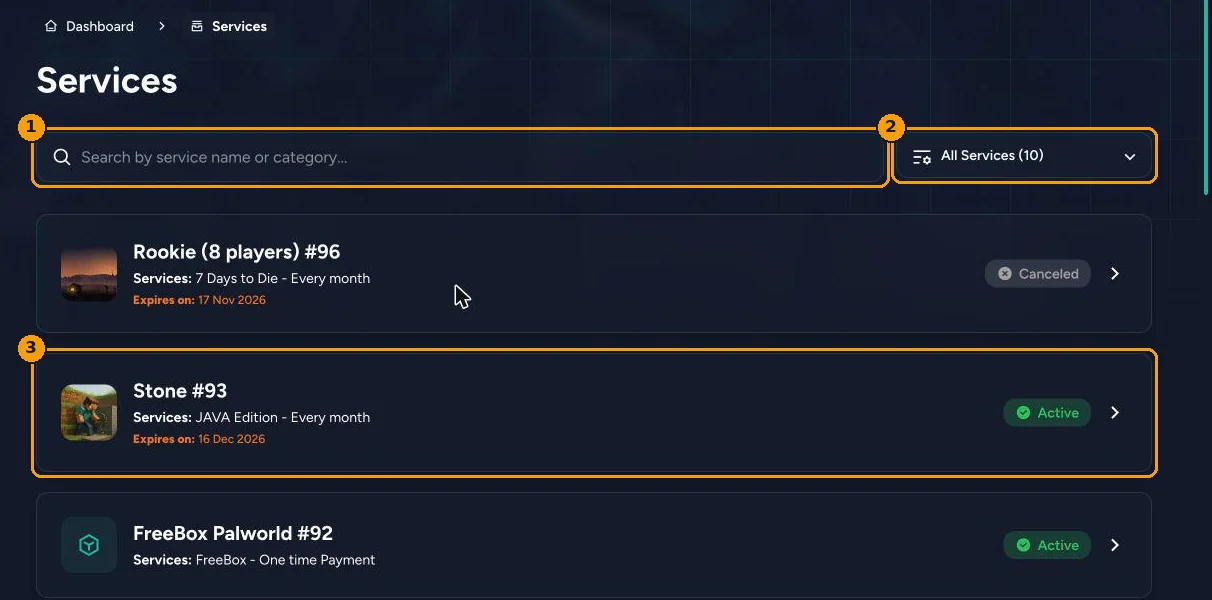
Reading the list
- The plan name and its number (for example “Stone #93”).
- The game and the billing cycle (every month, every 3 months…).
- The due date: the end of the current period, in other words the date of the next renewal.
- The service status.
| Status | Meaning |
|---|---|
| Active | The server is running and the current period is paid. |
| Pending | The order is recorded but not yet paid or not yet created. |
| Suspended | The server is stopped, usually because of an unpaid invoice. It becomes active again once the invoice is paid. |
| Cancelled | The service has been cancelled. The server and its files are deleted. |
Open a service
Click a service to show its details: price, billing cycle, due date, the Upgrade, Open the panel and Cancel Service buttons, and an overview of the server’s state.
Need a hand?
The Koinswift team answers 7 days a week, by ticket from your client area or on Discord.