


Control your server from the service page
Start, restart or stop your server and see its resources directly from the client area.
A service’s page, under Services, includes a Server overview. It lets you do the most common actions without opening the panel.
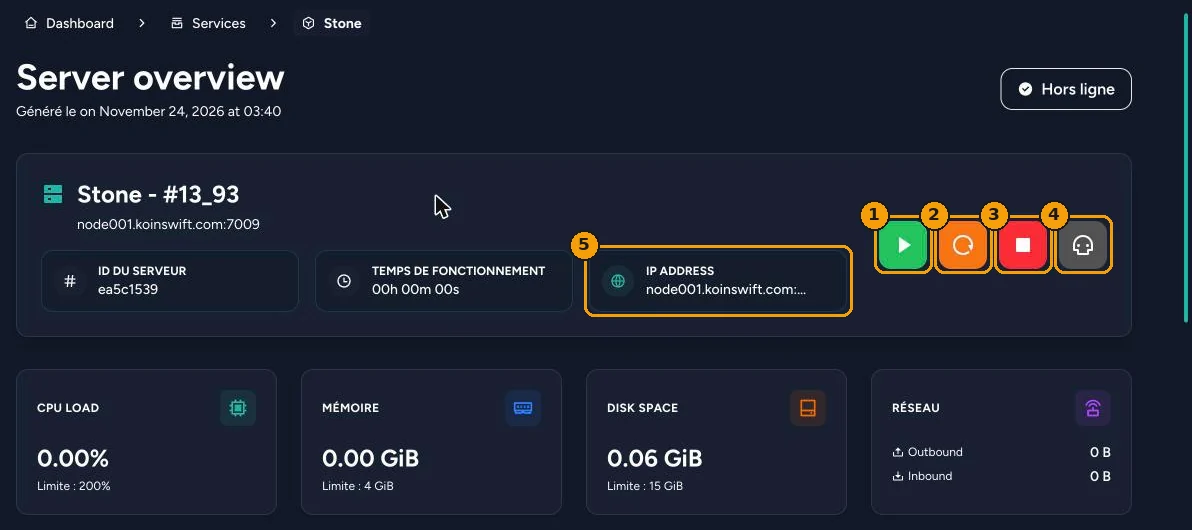
The power buttons
| Button | Effect |
|---|---|
| Start (green) | Starts the server. |
| Restart (orange) | Stops the server, then starts it again. |
| Stop (red) | Asks the game to shut down cleanly: it saves the world before stopping. |
| Force stop (grey) | Cuts the server off immediately, without saving. Only use it when the server no longer responds. |
Forcing a stop (“Kill”) can lose the last few minutes of play. Always try the Stop button first.
The information shown
- The IP address and port to give your players (for example
node001.koinswift.com:7009). - The uptime since the last start.
- The CPU load, memory, disk space and network in use, with your plan’s limits.
- The resources and limits: memory, disk, CPU, and the number of backups, ports (allocations) and databases included.
The CPU limit is shown as a percentage: 100% equals one processor core. A 200% limit therefore means 2 cores.
For files, the console and configuration, use the Open the panel button.
Need a hand?
The Koinswift team answers 7 days a week, by ticket from your client area or on Discord.