


Cancel a service
Stop a subscription at the end of the period or immediately, and get your data back before deletion.
Cancelling stops a service’s subscription. You choose whether it takes effect at the end of the period already paid or right away.
When the service ends, the server is stopped and then deleted with all its files. This data can no longer be recovered, not even by the Koinswift team. Download what you want to keep before the end date.
- Download your data
From the panel: a downloaded backup, or the important folders archived and then downloaded.
- Open the service
Under Services, click the service, then Cancel Service.
- Choose the cancellation type
At the end of the billing period: the server stays available until the end of the paid period. Immediate: the service stops right away.
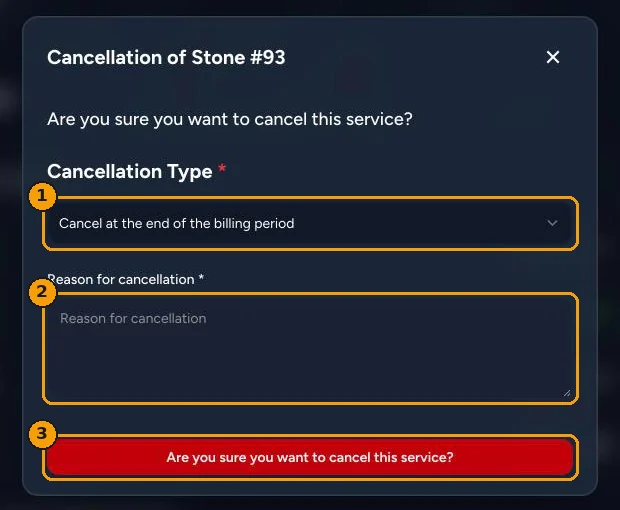
Cancellation type (1), reason (2), confirmation (3). - Give a reason
The field is required. Your answer helps us improve the service.
- Confirm
Click the red confirmation button. You receive a notification that your request has been recorded.
In most cases, choose at the end of the billing period: you make use of the period already paid and have time to retrieve your files.
Need a hand?
The Koinswift team answers 7 days a week, by ticket from your client area or on Discord.