


Compress and extract files (archives)
Create an archive to download a world, and extract a .zip or .tar.gz file uploaded to the server.
An archive bundles several files and folders into a single compressed file (.zip, .tar.gz). It is the easiest way to transfer a world or a modpack.
Create an archive
- Stop the server
For a complete, consistent copy of the world.
- Tick the items
Tick the folders and files to bundle.
- Click “Archive”
The button appears at the top as soon as an item is ticked. An archive named
archive-date.tar.gzis created in the folder.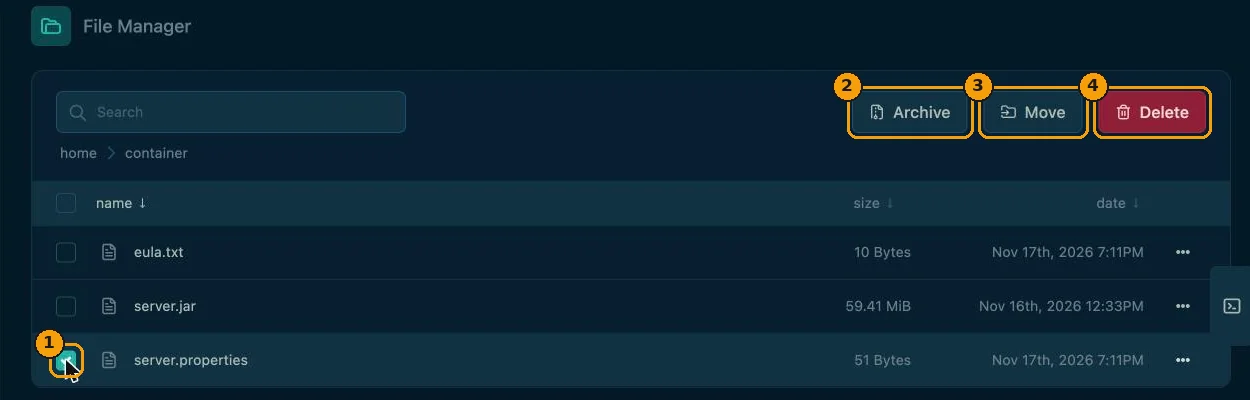
Ticked item (1), Archive (2), Move (3), Delete (4).
For a single item, the ••• menu on the right of the row also offers Archive.
Extract an archive
- Upload the archive
With Upload, into the folder where the content should go.
- Unarchive it
The archive’s ••• menu → Unarchive. The content is extracted into the current folder.
- Check the folder structure
If the archive contained an extra parent folder (for example
myworld/world/…), move the content to the right level.
Need a hand?
The Koinswift team answers 7 days a week, by ticket from your client area or on Discord.