


Manage your notifications (email and browser)
Choose which notifications you receive by email or in the client area, and enable push notifications.
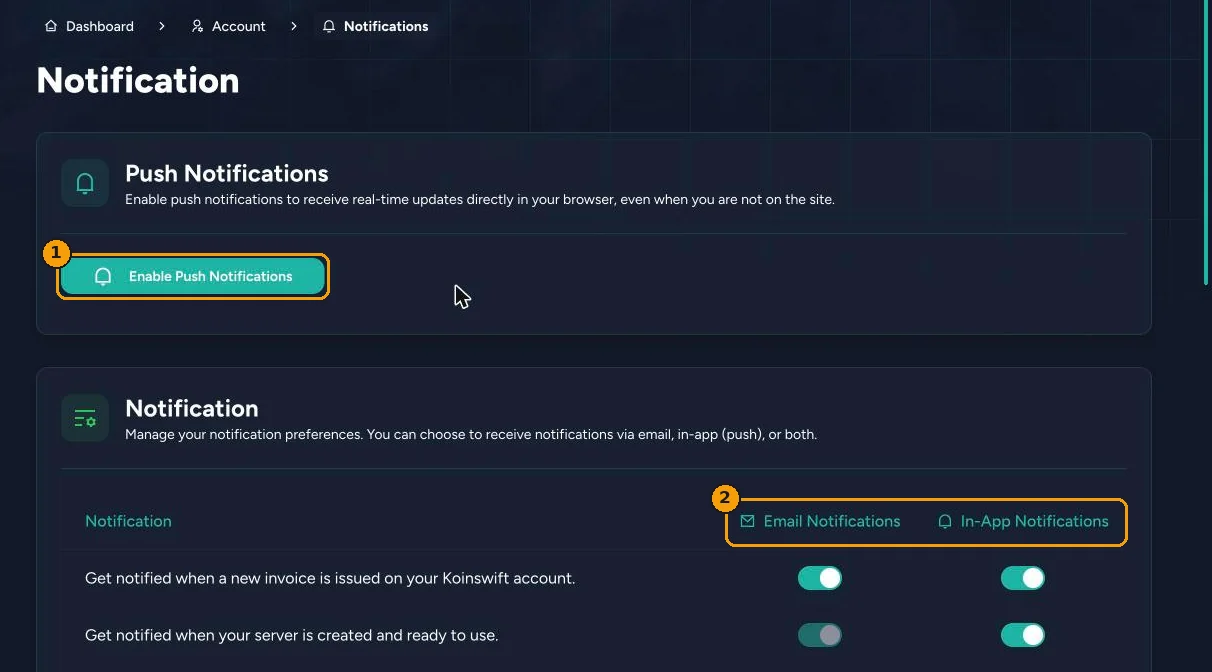
The Account → Notifications page lets you choose how you are told about important events on your account.
Push notifications
Push notifications appear in your browser, even when the client area is not open. Click Enable Push Notifications, then accept the browser’s permission request.
Choose per event type
Each event has two switches: Email Notifications and In-App Notifications (the bell at the top of the client area). The events include:
- a new invoice is issued;
- your server has been created and is ready to use;
- your server is suspended after a payment problem;
- one of your plans has been cancelled;
- a new reply on one of your tickets;
- a cancellation request has been processed.
At the very least, keep the invoice, suspension and ticket reply emails: they are the ones that save you from a service interruption or a needless wait.
Need a hand?
The Koinswift team answers 7 days a week, by ticket from your client area or on Discord.