


Move your server from another host
Get your files from your previous host and install them on your Koinswift server without losing your progress.
Leaving another host? Your world, settings and plugins can be carried over as they are: you only need to copy the right folders to your Koinswift server.
Keep your old server running until everything works at Koinswift, so you can still fetch a forgotten file.
The steps
- Order a plan for the same game
Choose the same game version and, for Minecraft, the same server type (Paper, Fabric…) as at your previous host. See Minecraft: choose the version and server type when ordering.
- Get your files
At your previous host, download a full backup or the folders you need (see the table below). A
.ziparchive transfers faster than thousands of small files. - Stop your Koinswift server
A running server can rewrite files while you replace them.
- Upload the files
In Files, click Upload. For several gigabytes, use SFTP software such as FileZilla instead.
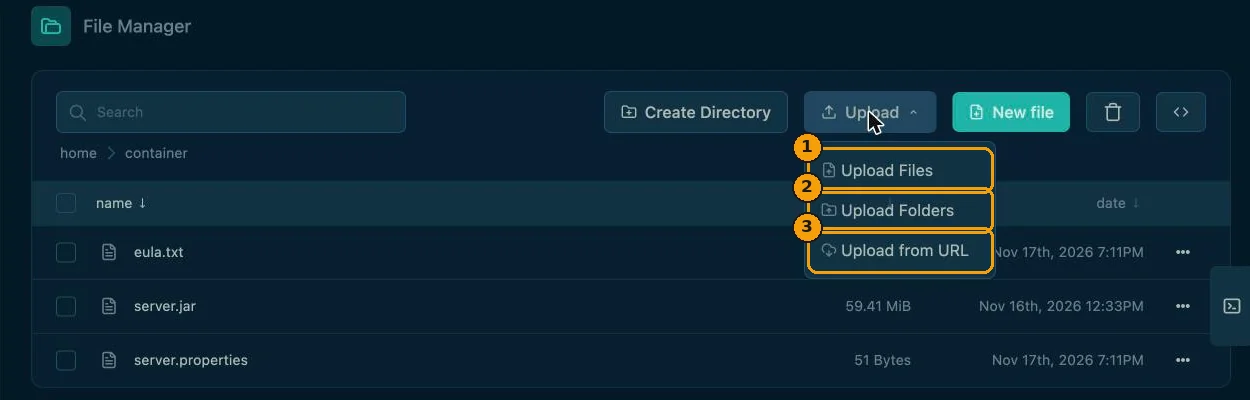
The Upload button of the file manager. - Extract and place the folders
Extract the archive, then move each folder to the root of the server, in place of the folder created by default.
- Start and check
Follow the startup in the Console, then join to check your game.
What to copy for each game
| Game | What to copy | Detailed guide |
|---|---|---|
| Minecraft Java | The world folder (world, plus world_nether and world_the_end on Paper), plugins or mods, server.properties |
Import an existing Minecraft world |
| Minecraft Bedrock | The world folder in worlds |
Import a Bedrock world (.mcworld) |
| Palworld | The world save folder | Import an existing Palworld world |
| Satisfactory | The .sav save file |
Import your Satisfactory save |
| Rust | The map files, player data and plugin configuration | Install Oxide or Carbon and Rust plugins |
| Enshrouded | The savegame folder |
Your Enshrouded server’s settings |
| ARK: Survival Ascended | The map folder in ShooterGame/Saved/SavedArks |
Set up your ARK server: map, game mode, rates and saves |
| FiveM (GTA V) | The resources folder and the server.cfg file |
Install a FiveM resource (script) |
Do not copy your previous host’s launch files (.sh or .bat scripts, the server .jar file): at Koinswift, startup is handled by the panel’s Startup page.
After the transfer
- The connection address changes: give your players the new address and port (where to find them).
- Admin accounts, whitelists and bans are kept if they were in the copied files.
- Create a backup as soon as everything works.
Need a hand?
The Koinswift team answers 7 days a week, by ticket from your client area or on Discord.