


Change the game on your paid server
Switch your server to another game: the request goes through support, who reinstall the server.
Changing the game of a paid server is done by support: we reinstall your server with the new game. The game must be one Koinswift offers.
The current game’s files (world, settings, plugins) are erased during the change. Download everything you want to keep before making your request.
- Download your files
Archive your world folder, then download it (see the guide). A downloaded backup works too.
- Open a ticket
From Tickets in the client area, give your server’s name and the game you want.
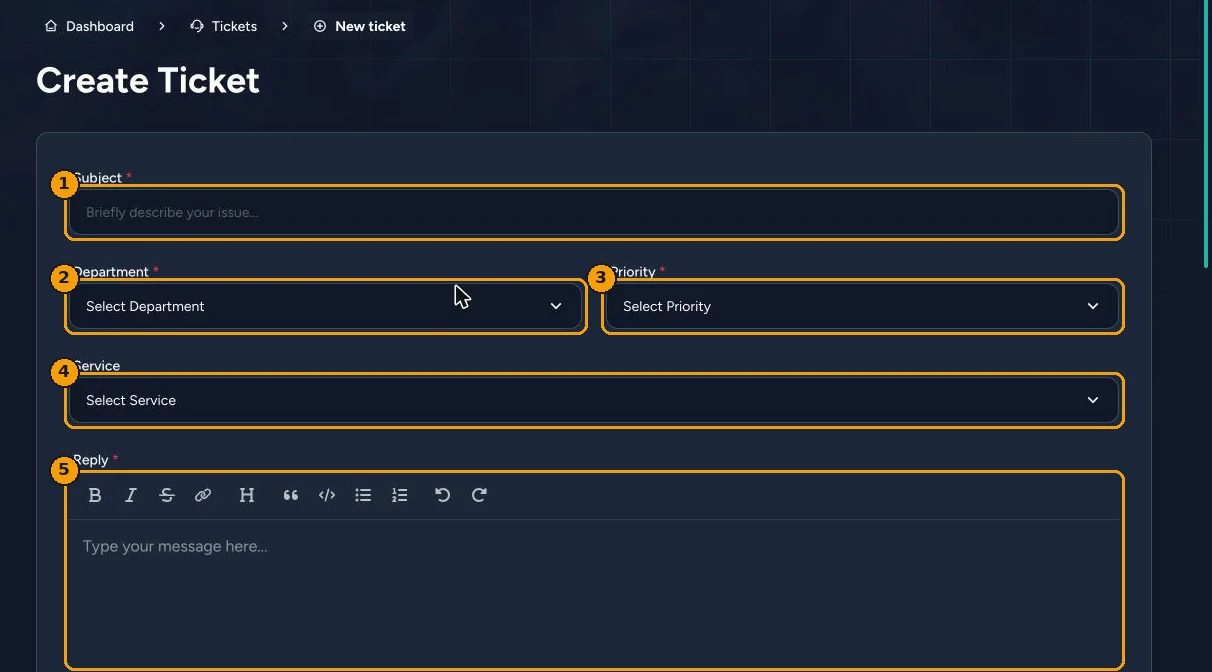
The client area ticket form. - Wait for confirmation
Support tells you whether your current plan suits the new game, or which plan to choose if it needs more resources.
- Start your server
Once the reinstallation is done, start the server from the panel and set up the new game.
Is your server only short of power for the current game? An upgrade is enough and keeps your files.
Need a hand?
The Koinswift team answers 7 days a week, by ticket from your client area or on Discord.