


Change the Java version (Minecraft)
Fix the “Unsupported Java Version” error by choosing a Java image that suits your Minecraft version.
Minecraft Java needs a specific Java version to start. If it does not match, the console shows an error such as Unsupported Java Version or UnsupportedClassVersionError.
| Minecraft version | Java required (guideline) |
|---|---|
| 1.16.5 and earlier | Java 8 (or 11) |
| 1.17 to 1.20.4 | Java 17 |
| 1.20.5 to 1.21.x | Java 21 |
| Most recent versions | Java 21 or newer: check the version announcement |
- Stop the server
Red button.
- Open Startup
Docker Image block.
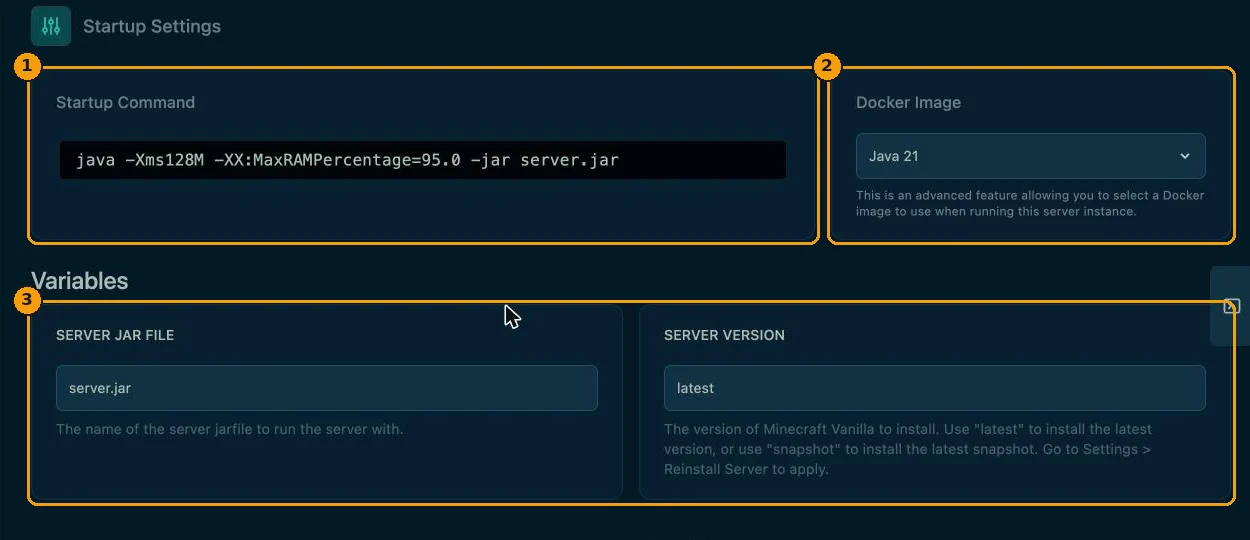
The Docker image selector (2) lists the available Java versions. - Choose the Java version
Select the right version in the list.
- Start and check
Read the console: the error message should no longer appear.
If none of the versions offered suits your Minecraft version, open a ticket: we will adjust your server’s environment.
Need a hand?
The Koinswift team answers 7 days a week, by ticket from your client area or on Discord.