


Adjust startup settings and variables
Understand the Startup page: launch command, Docker image and your game’s own variables.
The Startup page gathers the settings used when the server launches. They depend on the game.
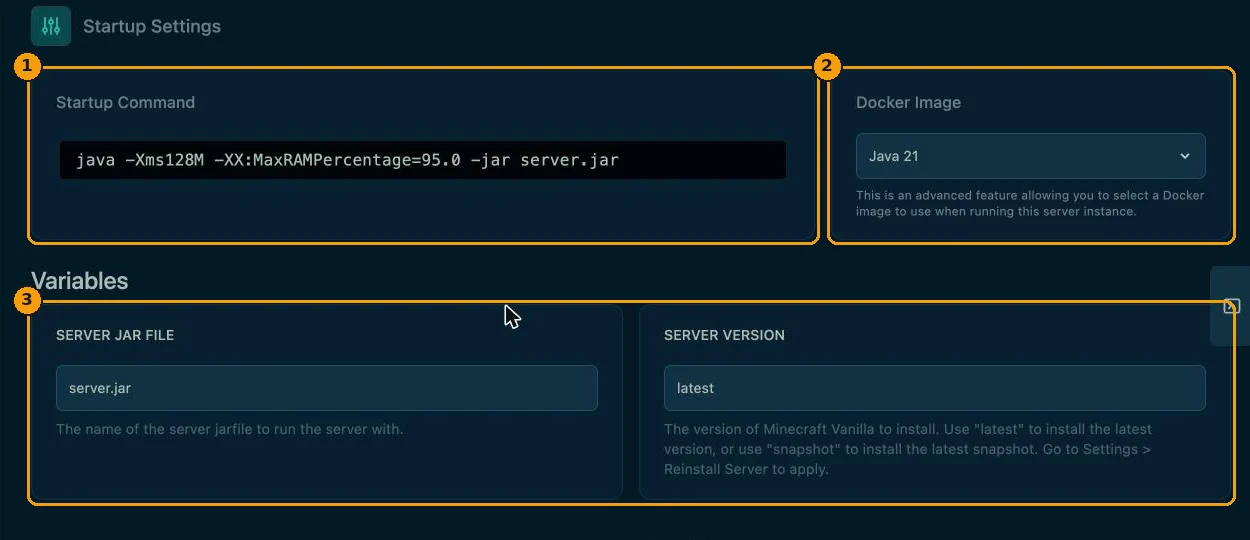
Startup command
The line that is run to launch the server. It is shown for information and cannot be edited.
Docker image
Your server runs in a container: an isolated environment that holds everything the game needs. The Docker image chooses that environment, for example the Java version for Minecraft. Only change it if a guide or support asks you to.
Variables
Variables are the game’s own settings: version, server name, password, number of players, licence key… Each variable is described under its field. Greyed-out fields are set by your plan.
- Change the value
Click in the field and type the new value. It is saved automatically when you leave the field.
- Restart
Most variables are read at startup: restart the server to apply them.
Some variables, such as the Minecraft version, only apply after a reinstallation (Settings → Reinstall Server). The variable’s description says so.
Need a hand?
The Koinswift team answers 7 days a week, by ticket from your client area or on Discord.