


Open the management panel from the client area
Open your servers’ panel in one click, with no extra password.
The panel is the tool that manages your servers: console, files, backups, settings. It lives at panel.koinswift.com, but you always enter it from the client area: sign-in is automatic, with no password to remember.
- Sign in to the client area
- Open your service
Under Services, click the server you want.
- Click “Open the panel”
The panel opens directly on your account.
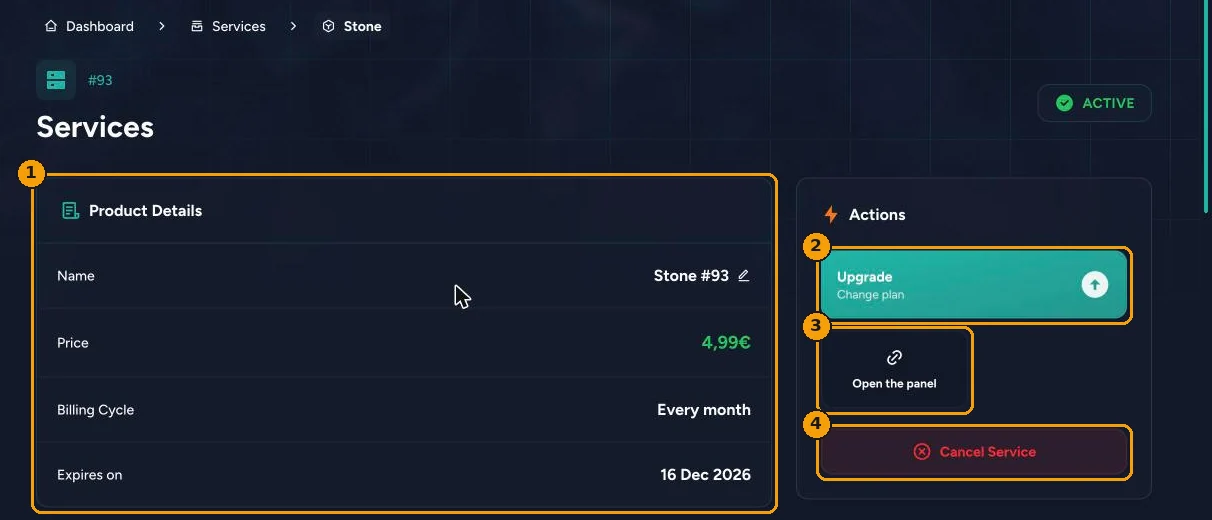
The Open the panel button (3).
You can also use the panel icon at the bottom of the client area menu, or the button in the “Your server is ready” email.
Panel sign-in page?
If you land on a panel sign-in page, go back to the client area and use Open the panel again. That is the normal way in, with no password to enter.
Need a hand?
The Koinswift team answers 7 days a week, by ticket from your client area or on Discord.