PALWORLD 1.0 — JULY 2026
Your Palworld server goes final
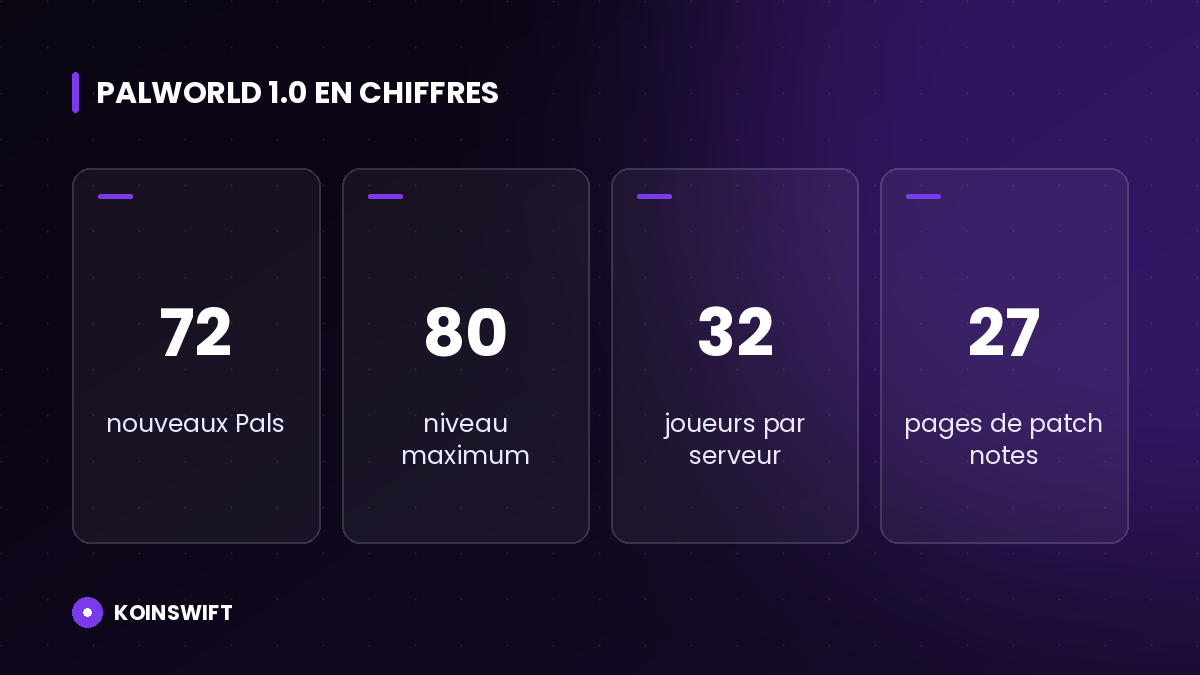
Pocketpair released Palworld 1.0 on July 10, 2026, with 27 pages of patch notes. Here’s what concretely changes for a dedicated server, the RAM to plan for and the steps to migrate without losing your world.
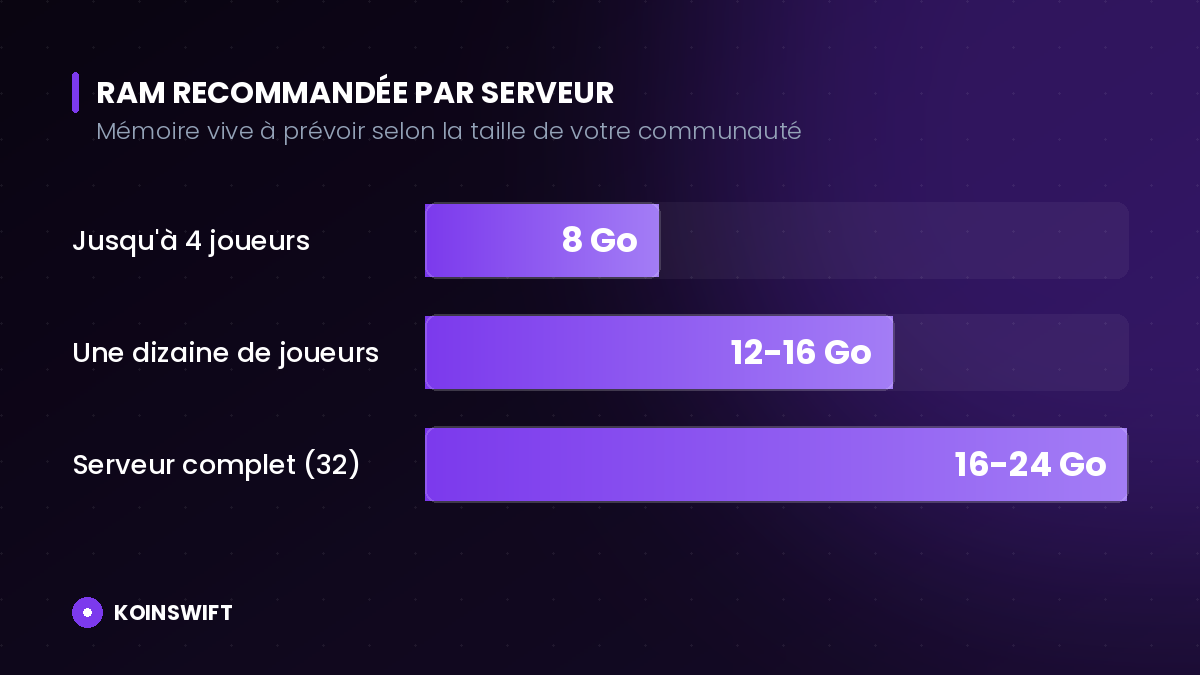
A Palworld server on version 1.0 requires between 16 and 24 GB of RAM to host 32 players, compared to 8 GB being enough for a game of four. The July 10, 2026 update adds 72 Pals, raises the max level from 65 to 80 and opens the Sunreach archipelago. Migrating an existing server takes a few minutes, provided you back up your world first.
🌴
Sunreach
A brand-new floating archipelago, its tower bosses and rare ores, accessible from your server.
🧬
Mutation and Awakening
Two progression systems that extend the endgame well beyond level 65.
🛠️
Controlled migration
Backup, file update, log check: the complete procedure step by step.
Palworld 1.0: what changes for your Palworld server
On July 10, 2026, Pocketpair ended two and a half years of early access. According to the official patch notes, the document exceeds 10,000 words and nearly hits the character limit Steam imposes on announcements. It’s the biggest delivery in the game’s history, and it arrives for free for all owners, on PC as on PlayStation 5, Xbox and Game Pass.
For an admin, three new features really matter. First, machine load, because the new content increases memory consumption. Next, multiplayer, reworked with voice chat and guild roles. Finally, migration, which requires a prior backup and updating mods one by one.
Competition on this keyword woke up fast. If you’re comparing offers before committing, our comparison of game server hosts in France details the criteria that really matter: latency, network security and support quality.
Key takeaway: before any major update, download a copy of the world folder outside the server. It’s the only real protection against data corruption.
Sunreach, World Tree and 72 Pals: the update’s content
Sunreach, a floating archipelago kept above Palpagos by Paldium energy, is the big geographic novelty. The area holds exclusive environments, civilizations, tower bosses and rare ores. According to the patch notes, several Pals can’t be captured anywhere else.
Next, the World Tree, a gigantic tree that stayed decorative throughout early access, finally becomes accessible. It serves as the setting for the end of the main story and concentrates much of the endgame content. The main missions have also been reworked.
The figures behind the 1.0 update:
| Item | Before 1.0 | Since July 10, 2026 |
|---|---|---|
| Max level | 65 | 80 |
| New Pals | — | 72 (47 new, 25 variants) |
| Players per server | 32 | 32, with full crossplay |
| Endgame progression | — | Mutation and Awakening |
Combat and partner skills were also reworked, with new weapons and additions to base building. The full details are in Dot Esports’ 1.0 patch notes recap, and the original announcement remains available on the official Palworld website.
How much RAM to plan for a Palworld server in 2026?
RAM remains the first stability factor. A server consumes more as players capture Pals and multiply bases. 1.0 amplifies this, since Sunreach and the World Tree add areas to load and level 80 mechanically lengthens worlds’ lifespan.
👥
Up to 4 players
8 GB is enough for a game among friends, with two or three modest bases.
🏘️
Around ten players
Allow 12 to 16 GB once bases multiply and the map fills up.
🏙️
Full 32-player server
Plan 16 to 24 GB to hold up in the endgame with hundreds of captured Pals.
The processor matters just as much, though, because Palworld makes poor use of multithreading and depends heavily on per-core performance. High frequency makes more of a difference than a large number of cores. Standard plans run on Intel Xeon processors, while a Ryzen 9 9950X range handles the most demanding loads.
Important: These values are indicative. The amount of RAM alone doesn’t guarantee performance: the processor, server software, number of simultaneous players, simulation distance, number of entities and extensions also influence the result.
Classic mistake: sizing RAM on the number of players connected on day one. A Palworld server grows mainly over time, not with attendance. Plan the headroom from the start.
Installing and configuring a Palworld 1.0 server step by step
In practice, the procedure takes five steps from a hosting panel. It assumes your Palworld server is already running, or that you’re starting from a fresh installation.
Back up the world
First of all, download the save folder from the file manager. It’s your only safety net.
Stop the server cleanly
Use the panel’s stop command rather than an abrupt shutdown, so the save closes properly.
Update the files
Run the server update from your panel. The 1.0 files replace the previous version.
Check the configuration
Open the PalWorldSettings.ini file and check the number of players, the password and the difficulty settings.
Restart and read the logs
Restart the server, then watch the console. A version error appears immediately if a file was replaced incorrectly.
On a Koinswift Panel, the open-source game server management panel, these five steps are done without the command line. Our Koinswift customer area guide shows where to find the file manager and automatic backups.
Crossplay, voice and guilds: multiplayer reworked
Concretely, the final version extends crossplay to everyone. Steam, Xbox, PlayStation 5 and Mac players now meet in the same persistent world, whereas console co-op was limited to four participants. A dedicated server remains the only way to host 32 players simultaneously.
In addition, proximity voice chat is now built into the game, without third-party software. Guilds also gain roles with permissions, which makes running a community easier. A moderator can thus oversee builds without having all rights.
Migrating an existing Palworld server to 1.0
First, an earlier save remains readable by 1.0. Migration therefore doesn’t require starting from scratch. Two precautions nonetheless avoid most of the incidents seen since July 10, 2026.
First precaution: keep an off-server copy of the world folder. Second precaution: update mods one by one, because a mod compiled for 0.x often causes a crash at startup. Re-enable them gradually to identify the culprit.
Good habit: test the migration on a copy of the world before touching the main server. Thirty minutes of testing saves an evening of restoring.
Common errors on a Palworld server and solutions
🚫
The server doesn’t appear
Check that the server port, shown in your panel, is open and that the server is listed in community mode.
💥
Crash at startup
Almost always an incompatible mod. Disable them all, then re-enable them one by one.
🐌
Lag in the endgame
A classic sign of insufficient RAM. Monitor consumption and increase the allocated memory.
🔑
Connection refused
The password in the configuration file takes precedence over the panel’s. Check both.
Current offers
KOIN50
50% off for 6 months. The 6 GB plan then comes to 2,00 € per month.
FREE1
One month free, valid on all game servers in the catalog.
Codes to enter when ordering.
PALWORLD 1.0 SERVER
Launch your Palworld server at Koinswift
High-performance processors, datacenter in France and Koinswift Panel. Automatic backups and support 7 days a week.
Self-host or use a host?
You have two options. The first is to host the machine at home, on a dedicated PC or a NAS. The second goes through a specialized host. The choice depends mainly on your tolerance for outages.
Self-hosting looks cheap. However, it ties up a machine continuously, exposes your personal IP address and leaves your world offline as soon as the router restarts. In addition, no serious network filtering is in place, which becomes a real problem as soon as a server goes public.
A host pools these constraints. The machine runs in a datacenter, network protection is included and backups trigger automatically. At Koinswift, for example, servers are located in France, which limits latency for a French-speaking community.
The right reflex: test before investing. A badly sized server is changed in two clicks at a host, while a hardware purchasing mistake follows you for years.
Frequently asked questions about Palworld 1.0 servers
Do you need to buy the game again to move to 1.0?
No. The 1.0 update is free for all owners of the game, on PC, PlayStation 5, Xbox and Game Pass.
Do my old saves still work?
Yes, a world created before July 10, 2026 remains playable. Still, back it up before the migration.
How many players on a dedicated Palworld server?
Up to 32 simultaneous players, compared to four in standard console co-op.
How much RAM for 32 players?
Plan 16 to 24 GB. Below that, slowdowns arrive as soon as bases multiply.
Are 0.x mods still compatible?
Rarely. Wait for each mod’s update, then re-enable them one by one to spot conflicts.
Does crossplay work on a dedicated server?
Yes, 1.0 brings Steam, Xbox, PlayStation 5 and Mac players together in the same world.
Conclusion
Palworld 1.0 turns an early access game into a finished title, with Sunreach, the World Tree, 72 additional Pals and a max level raised to 80. For an admin, the switch boils down to three steps: back up, update, check the logs.
The real issue remains sizing. In practice, an undersized machine holds up for a few weeks, then collapses as bases pile up. Aiming for 16 GB from the start for an active group costs less than an emergency migration.
If you’re still unsure which configuration to choose, a well-sized server can be changed in a few clicks from the panel, without starting from scratch.
💡 Key takeaway Palworld 1.0 was released on July 10, 2026 with Sunreach, the World Tree, 72 Pals and level 80. Allow 8 GB of RAM for four players, 16 to 24 GB for a full 32-player server. Back up before migrating and re-enable your mods one by one.