MINECRAFT · JULY 2026
Sizing your Minecraft server without getting it wrong
Since Chaos Cubed, released on June 16, 2026, running a Minecraft server has changed. Here’s the memory to plan for according to your play profile, what hosting really costs and how to avoid undersizing.
A Minecraft server needs about 200 MB of memory per player in Vanilla, and double that once a modpack comes into play. Concretely, 2 GB is enough for five players without plugins, 6 to 7 GB becomes necessary around fifteen players, and a heavy modpack requires 12 to 16 GB. Budget-wise, allow about 4 € per month for an entry-level 6 GB.
🧮
The 200 MB rule
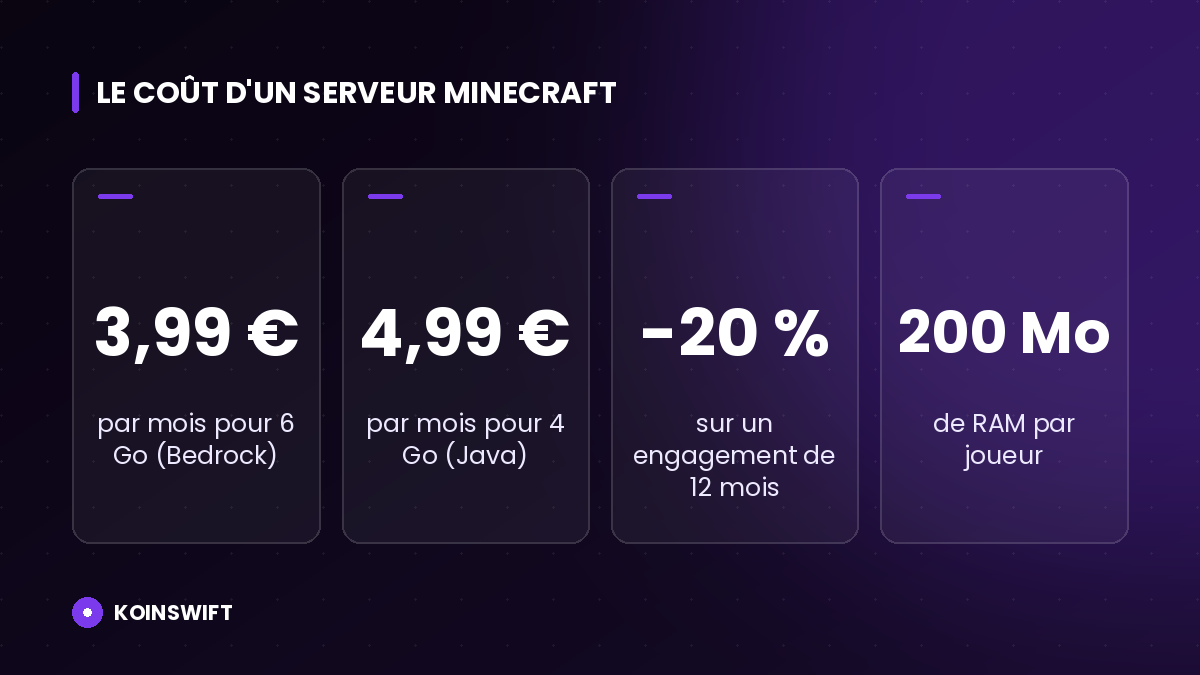
Allow 200 MB per player in Vanilla, double when modded. It’s the basis of all sizing.
⚙️
Chaos Cubed
Admin dashboard, tick monitoring and scheduled backups in the background.
💶
The real cost
What makes the bill vary: RAM, processor frequency and the number of backups.
Minecraft 26.2 server: what Chaos Cubed changes
Mojang released version 26.2, named Chaos Cubed, on June 16, 2026 on Java. This release marks a turning point for admins. Numbering now follows the year.update.patch format: 26.2 therefore refers to the second release of 2026. This convention makes version tracking easier for admins.
The most useful server-side addition is a real admin dashboard. It lets you restart without losing data for players mid-session, and includes tick speed and memory consumption monitoring. Previously, this information required a dedicated plugin.
In addition, the backup scheduler runs in the background without crushing performance. Chunk loading also becomes more efficient, which allows more simultaneous players on the same configuration. Finally, network sync is more stable, which reduces rubberbanding.
Key takeaway: Chaos Cubed’s chunk loading gains don’t replace memory. They let you host a few more people, not halve your RAM needs.
How much RAM for a Minecraft server in 2026?
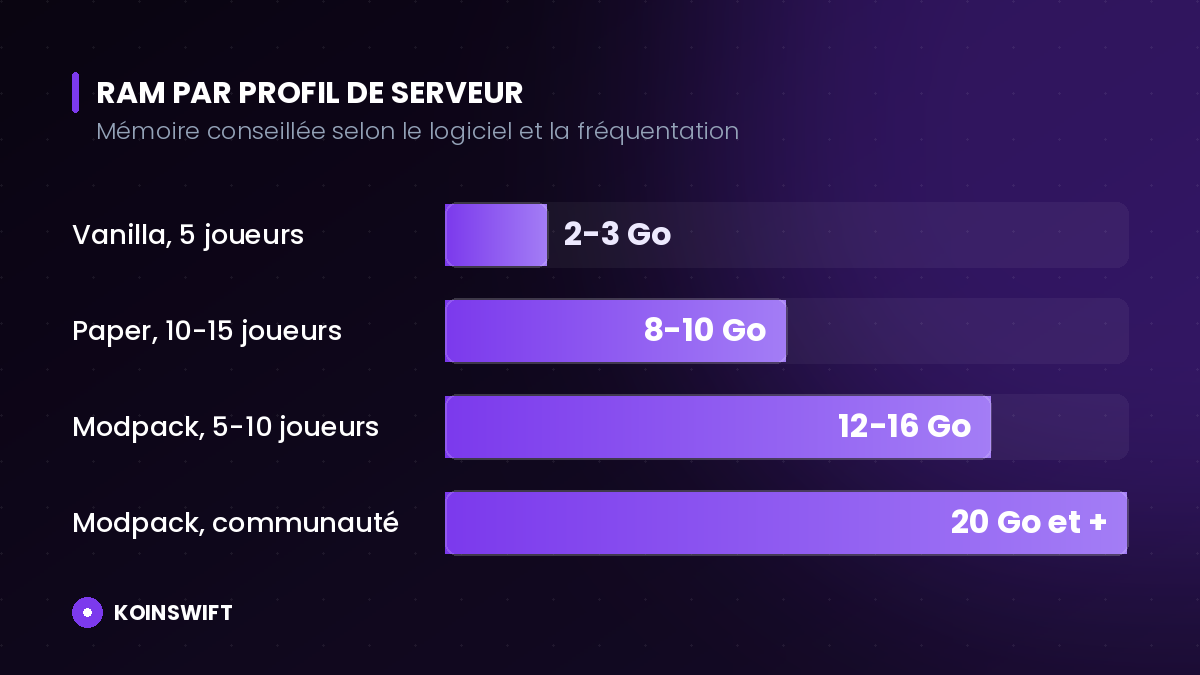
RAM remains the first stability factor. A server short on RAM shows it through stuttering, chunks slow to appear and, in severe cases, disconnections. The basic calculation fits in one simple rule: about 200 MB per connected player in Vanilla.
Memory to plan for by play profile:
| Profile | Players | Recommended RAM |
|---|---|---|
| Vanilla among friends | 5 | 2 GB |
| Vanilla + a few plugins | 5 | 3 GB |
| Paper + plugins | 10 à 15 | 8 to 10 GB |
| Modpack, small group | 5 à 10 | 12 to 16 GB |
| Heavy modpack, community | 20 and more | 20 GB and more |
Important: These values are indicative. The amount of RAM alone doesn’t guarantee performance: the processor, server software, number of simultaneous players, simulation distance, number of entities and extensions also influence the result.
Finally, a complementary rule helps refine things: for every ten to fifteen plugins, add about 1 GB. A Minecraft server rich in extensions therefore consumes much more than a classic survival world, even at identical attendance.
Vanilla, Paper or modded: the impact on memory
The server software weighs as much as the number of players. Paper, an optimized server core derived from Spigot, remains the most widespread solution. Thanks to its optimizations, a well-tuned Paper server offers better performance while using less memory than an equivalent Vanilla server.
Modding, however, changes the scale completely. A modpack rarely starts below 6 GB, and the heaviest packs exceed 20 GB once a community settles in. In practice, always double your Vanilla estimate before adding mods.
🌱
Vanilla
The official server, without optimization. Simple, but demanding beyond about ten players.
📄
Paper
The default choice for a public server: plugins, better performance, better-managed memory.
🧱
Modded
Forge or NeoForge. Allow at least 6 GB, and much more for a full modpack.
How much does a Minecraft server cost per month?
Concretely, the price depends on three items: the amount of memory, processor frequency and associated services, such as the number of backups or storage space. An entry-level Minecraft server remains affordable, as long as you don’t confuse raw power with real comfort.
At Koinswift, the entry-level Bedrock plan combines 2 cores at 3.6 GHz, 6 GB of RAM, 30 GB of storage and 2 backups, for 3,99 € per month with no commitment. On the Java side, the same logic starts at 1,79 € per month for 4 GB, and 4,49 € per month for 8 GB with 4 cores. Longer commitments reduce the bill by 10% over three months, 15% over six months and 20% over twelve months.
What’s expensive: it’s not RAM, it’s an emergency migration. An undersized server forces you to move the world, reinstall plugins and interrupt the community. Planning generously from the start costs less.
Current offers
KOIN50
50% off for 6 months. The 6 GB plan then comes to 2,00 € per month.
FREE1
One month free, valid on all game servers in the catalog.
Codes to enter when ordering.
Processor frequency deserves particular attention, because Minecraft depends heavily on per-core performance. A recent high-frequency machine outperforms one with many slower cores. Standard plans run on Intel Xeon processors, and a separate Ryzen 9 9950X range targets the most demanding loads.
Sizing your Minecraft server right the first time
In practice, the method takes five steps. It avoids the most widespread mistake, which is choosing a plan based on the displayed price alone.
Estimate actual attendance
Count the number of players connected at the same time, not the number of registered members. The gap is often one to five.
Choose the server software
Vanilla, Paper or modded: this choice determines the baseline consumption before the first player even joins.
Apply the 200 MB rule
Multiply by the number of simultaneous players, then double if you go for a modpack.
Add the plugin margin
Allow 1 extra GB for every ten to fifteen installed extensions.
Plan a 30% reserve
A world grows over time. This margin avoids a migration after three months.
Once the server is running, monitor memory from the 26.2 dashboard or from your panel. Our customer area guide details where to find these indicators along with automatic backups.
Java or Bedrock: which Minecraft server to choose?
First, Java remains the reference for community servers, because it concentrates the plugin and mod ecosystem. Bedrock, for its part, brings players together on console, mobile and Windows, which considerably widens the potential audience of a family or friends’ server.
Next, the choice depends mainly on your community rather than on technical aspects. If your players are on PlayStation, Xbox or tablet, Bedrock is the obvious choice. If you’re aiming for a modded survival server with a hundred plugins, Java remains essential.
Good to know: Java and Bedrock aren’t natively compatible and share neither worlds nor plugins. A bridge like Geyser can, however, let some Bedrock players join a Java server, with limits depending on versions, plugins and platforms.
Monitoring your Minecraft server day to day
Good sizing doesn’t replace monitoring. Two indicators are enough to spot a problem before players do: tick speed and memory used. A healthy server runs at 20 ticks per second.
As soon as this value stays below 18, the server is struggling. In practice, the causes are almost always the same: too many mobs, a badly designed farm, a resource-hungry plugin or simply a lack of memory. The 26.2 dashboard now displays both curves without an additional plugin.
Useful habit: note the average consumption on a high-traffic evening, not a Tuesday afternoon. That peak determines how much memory you really need.
Common sizing mistakes
📉
Aiming for the minimum
Taking 2 GB for a Paper server with plugins. Stuttering starts at around ten players.
🔢
Counting registered members
Sizing for 80 Discord members when 12 connect at the same time.
🧩
Forgetting plugins
Thirty extensions easily add 2 to 3 GB to baseline consumption.
🕳️
Neglecting growth
A survival world active for six months weighs far more than on day one.
MINECRAFT SERVER
Launch your server with Koinswift
High-frequency processors, NVMe storage, datacenter in France and Koinswift Panel. Automatic backups and support 7 days a week.
Frequently asked questions about Minecraft 26.2 servers
How much RAM for ten players?
Allow 6 to 7 GB in Vanilla, and 8 to 10 GB with Paper and a set of plugins.
Does Chaos Cubed reduce memory needs?
No. 26.2 improves chunk loading and networking, but per-player consumption stays comparable.
Should you switch to Paper rather than Vanilla?
Yes, once a server goes public. Paper uses less memory and accepts plugins.
What monthly budget to get started?
A 6 GB plan costs around 4 € per month, which covers a server among friends with a few plugins.
Can you increase RAM later?
Yes, at most hosts, in a few clicks from the panel, without losing your world.
Do Java and Bedrock share worlds?
No. The two editions use different formats, with no native bridge between them.
Conclusion
Sizing a Minecraft server means combining three pieces of data: the number of truly simultaneous players, the chosen server software and the volume of extensions. The 200 MB per player rule gives a reliable base, to double when modded and to increase by about 1 GB per batch of plugins.
Chaos Cubed, released on June 16, 2026, makes monitoring much easier thanks to its built-in dashboard. The version’s new features are detailed on the official Minecraft website, and our guide on the Happy Ghast illustrates the kind of content these updates bring.
Finally, there’s the budget. Between 4 and 9 € per month depending on memory, the price gap weighs less than a failed migration. If you’d rather measure before choosing, our free FreeBox lets you test a real machine. And to compare market players, our comparison of French hosts sets out objective criteria.
💡 Key takeaway Allow 200 MB per player in Vanilla and double when modded. Add 1 GB per ten to fifteen plugins, then a 30% reserve for world growth. A 6 GB server starts at around 4 € per month, and since June 16, 2026 Chaos Cubed brings a dashboard that simplifies monitoring.