Find out how to install mods on Hytale solo or on a server, where to find reliable mods, how to avoid common mistakes and how to prepare a modded server properly.
Hytale guide 2026
Installing Hytale mods the right way
Mods let you enrich Hytale with new content, mechanics, biomes, interfaces or game systems. In this guide, we explain how to install them properly solo, on a server, via CurseForge, manually or from a hosting panel.
🧩
Solo mods
Install mods to enrich your personal game with CurseForge or manually.
🌐
Modded server
Add server-side mods to play with your friends in a synchronized environment.
🛡️
Reliable sources
Use recognized platforms to avoid dubious files and compatibility problems.
Context: why install mods on Hytale?
Hytale is a game built around creativity, exploration and multiplayer. As with many sandbox games, mods hold an important place in the experience: they let you add content, change certain mechanics, enrich the adventure or create a server with a unique identity.
A mod can add new items, new weapons, custom armor, biomes, quests, interfaces, economic systems, magic mechanics or tools designed for community servers. In short, mods extend the game’s lifespan and give more freedom to players and admins alike.
This guide is aimed both at beginners and at players used to Minecraft or other modded games. The goal is to simply explain how to install your first Hytale mods, whether you play alone or with friends on a server.
Key takeaway: solo or in multiplayer, mods should always be installed with reliable files, compatible with your game version and ideally backed up before modifying your world.
1. What is a Hytale mod?
A mod, short for modification, is a file or set of files that change the game’s behavior. It can be a simple visual addition, a new biome, a complete quest system or a mechanic that profoundly transforms the way you play.
In Hytale, mods are particularly important because the game was designed with a very open approach to content creation. For a player, this means you can enrich your experience without necessarily knowing how to code. For a server admin, it makes it possible to create more personalized and engaging gameplay.
⚔️ Gameplay
New mechanics, magic, economy, progression or modified combat.
🌍 World
Biomes, dungeons, structures, resources and improved generation.
🎒 Content
Items, weapons, armor, crafting recipes and custom equipment.
🖥️ Interface
Interface improvements, menus, maps, HUD or admin tools.
Most of the time, as a player, you don’t need to understand how the mod works technically. Your job is mainly to download the right file, put it in the right place and check that it’s compatible with your version of Hytale.
2. Understanding Hytale’s “server-first” logic
Hytale adopts an approach often called server-first. This means the server plays a central role in the experience, even when a player uses a mod in a solo or multiplayer context. This approach is important to understand, because it influences how mods are installed and managed.
In multiplayer, mods generally need to be installed on the server side so all players have the same experience. This avoids differences between clients, limits desyncs and lets the server properly control the loaded content.
Why it’s handy: when a server manages mods properly, players don’t each need to do a complex installation on their end. The server becomes the reference and guarantees everyone uses the same configuration.
This approach is very useful for community servers. It makes it possible to offer a cleaner, more stable modded experience that’s simpler for players to join.
3. Where to find reliable Hytale mods?
Before installing a mod, you need to choose a reliable source. It’s an essential step. A mod downloaded from a dubious site can be incompatible, corrupted or potentially dangerous. It’s better to favor recognized platforms, with reviews, version history and an active community.
🧩
CurseForge
Popular platform to easily find, manage and update mods.
🌱
Modrinth
A serious alternative, appreciated for its clear interface and creative community.
💻
GitHub
Useful for experimental mods, beta versions and open-source projects.
Warning: avoid third-party sites that republish mods without control. Always check the update date, reviews, compatible version and creator’s name before installing a file.
4. Installing Hytale mods solo
For a solo game, there are two main methods: installation via an app like CurseForge, or manual installation. The first is simpler for beginners, while the second gives you better control over installed files.
Recommended method: install with CurseForge
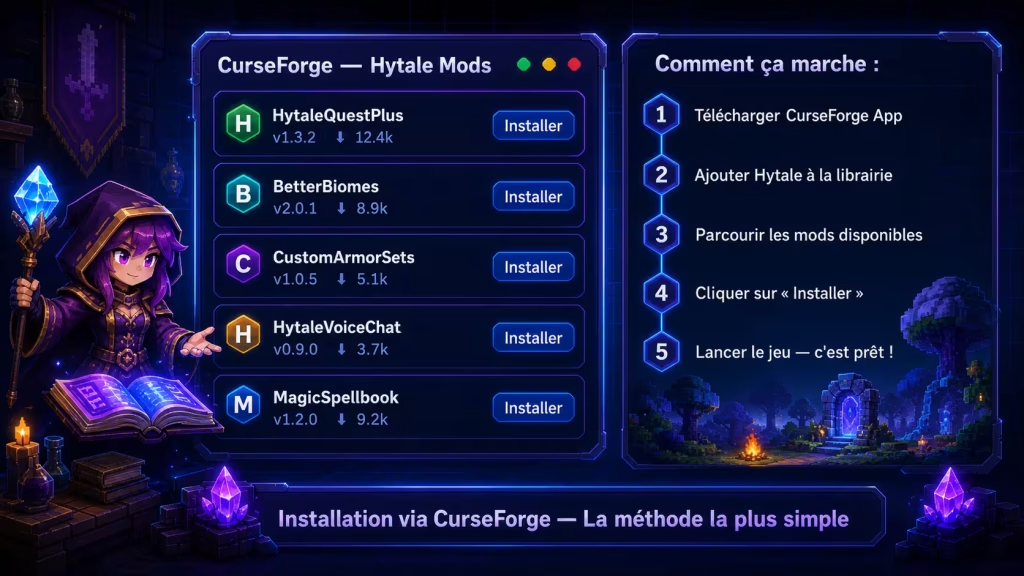
The CurseForge app simplifies installing mods. It lets you search for mods, install, update and disable them without directly handling the game files.
Download CurseForge
Install the CurseForge app on your computer from the official website.
Add Hytale
Search for Hytale in the app and add it to your library of modded games.
Choose your mods
Browse the available mods, check compatibility, then click install.
Launch Hytale
Launch the game from CurseForge with the mods enabled on the chosen profile.
Installing mods manually
Manual installation consists of downloading the mod file, then placing it in the folder provided by Hytale. This method is useful if a mod isn’t available in the CurseForge app or if you want to manage your files directly.
Common mods folder locations:
| Windows | Documents\Hytale\mods\ |
| macOS | ~/Library/Application Support/Hytale/mods/ |
| Linux | ~/.var/app/com.hypixel.HytaleLauncher/data/Hytale/mods/ |
Download the mod file, usually in .zip or .jar format, then place it in the mods folder without unzipping it. Then launch Hytale and enable the mod from your world or profile settings.
Tip: create several profiles with different mod lists. You can, for example, have an adventure profile, a building profile, a PvP profile and a test profile.
5. Installing mods on a Hytale server
Installing mods on a Hytale server lets you share the same experience with all players. It’s the ideal method for an adventure among friends, a community server, a roleplay server or a more ambitious project.
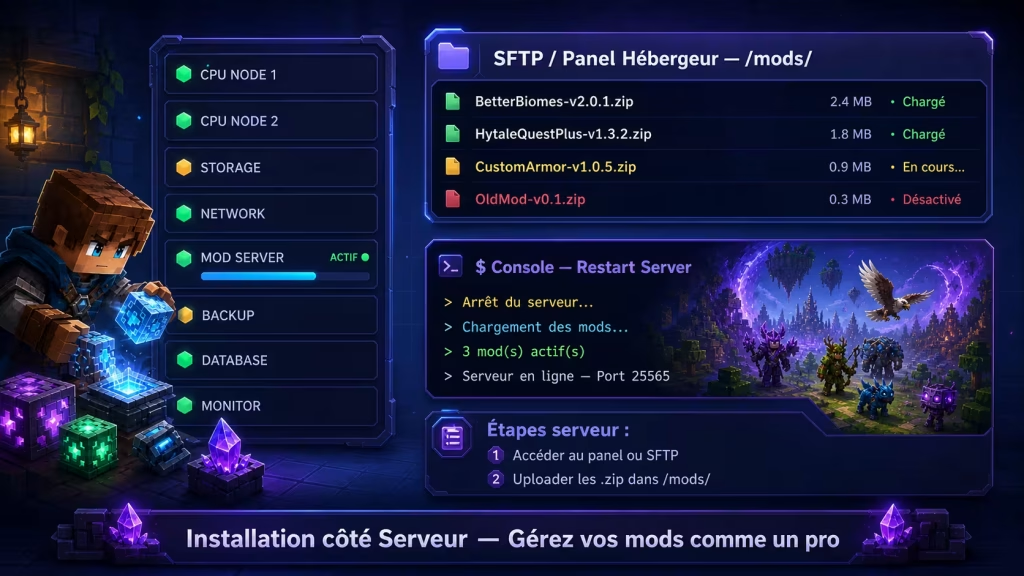
Modded Hytale server
For a stable modded server, it’s advisable to use hosting designed for games. A simple panel lets you upload files, restart the server and check the logs without going through complex configuration.
Method 1 — Install mods via the panel
The most accessible method is to use your host’s panel. From the file manager, you can add mods directly to the dedicated folder.
Download the mod
Get the file from a reliable source like CurseForge, Modrinth or GitHub.
Open the file manager
Log in to the server panel and open the files section.
Upload the file to /mods/
Place the mod file in the server folder intended for mods.
Restart the server
Restart the server and check in the console that the mod loads correctly.
Method 2 — Install mods via SFTP
If you’re more technically comfortable, you can use an SFTP client like FileZilla or Cyberduck. This method is handy for uploading several mods at once or managing the server’s file tree more finely.
- Get the SFTP credentials from your panel.
- Connect with an SFTP client.
- Open the server’s
/mods/folder. - Drag the mod files into this folder.
- Restart the server from the panel.
Tip: after each installation, check the server console. If a mod is incompatible, badly loaded or conflicts with another, the logs often show a useful error message.
6. Top 5 Hytale mods to try when starting out
Once you know how to install mods, the hardest part is often knowing which ones to choose. To start, it’s better to favor simple, popular mods compatible with your game version.
Before adding several mods at once, start with a light installation. Then add mods gradually, one by one, to more easily identify any conflicts.
7. Troubleshooting: common errors and solutions
Mods can sometimes cause errors, especially if several files are incompatible with each other or if the game version doesn’t match. Here are the most frequent problems and the right reflexes to adopt.
The mod doesn’t appear in game
Check that the file is in the right folder, that it wasn’t unzipped by mistake and that it’s compatible with your version of Hytale.
The game or server crashes at startup
Remove recently added mods, then re-enable them one by one to identify the one causing the crash.
“Version mismatch” message
This often means the mod isn’t made for your current game version. Update the mod or use a compatible version.
Other players don’t see the mod
In multiplayer, the mod must be installed on the server side. Installing it only on your computer isn’t enough for other players.
Important: always back up your world before adding, removing or updating mods. This avoids losing your progress in case of a conflict or data corruption.
8. Frequently asked questions about Hytale mods
Are Hytale mods free?
Most community mods are free. Some creators may offer premium versions, but basic mods are generally freely available.
Can mods damage a save?
Yes, especially if a mod adds specific data and is then removed. It’s recommended to back up your world before any major change.
Can you play with mods in multiplayer?
Yes. For a multiplayer server, mods must be installed on the server side so that all players use the same configuration.
Are mods allowed on Hytale?
Mods are at the heart of the Hytale ecosystem. However, cheats or tools giving an unfair advantage may be banned on some servers.
Do you need to know how to code to install mods?
No. To install and use mods, you just need to follow the installation steps. Code only concerns players who want to create their own mods.
Conclusion
Installing mods on Hytale is much simpler once you understand the general logic: choose a reliable source, check compatibility, put the file in the right place and restart the game or server. For a solo game, CurseForge remains the most accessible method. For a server, the hosting panel or SFTP lets you manage files cleanly.
Mods will play a major role in Hytale’s evolution. They’ll let players customize their adventure, communities create unique servers and admins offer experiences far richer than the base game.
To play with friends in good conditions, a well-configured and well-hosted Hytale server remains essential, especially if you plan to use several mods or build a real community around your world.
Modded Hytale server
Launch your Hytale server with Koinswift
High-performance servers, intuitive panel, responsive support and an environment suited to community projects.
Discover Koinswift Hosting💡 Key takeaway
To install mods on Hytale, use reliable sources, check compatibility with your game version, back up your worlds and add mods gradually. In multiplayer, mods must be installed on the server side so all players enjoy the same experience.