


Let Bedrock players join your Java server (Geyser and Floodgate)
Install Geyser and Floodgate so Bedrock players (consoles, mobile, Windows) can join your Java server.
A Java server normally only accepts Java players. Two plugins change that: Geyser translates Bedrock (consoles, mobile, Windows) to Java, and Floodgate lets Bedrock players join without a Java account.
What you need
- A Paper or Spigot server (change the server type).
- A second port on the Network page: Bedrock players will use it.
A FreeBox includes only one port and cannot use Geyser. See FreeBox: how many ports, and what if I need more?.
Installation
- Find your second port
In Network, note the port that is not marked Primary. You can add the note “Geyser”.
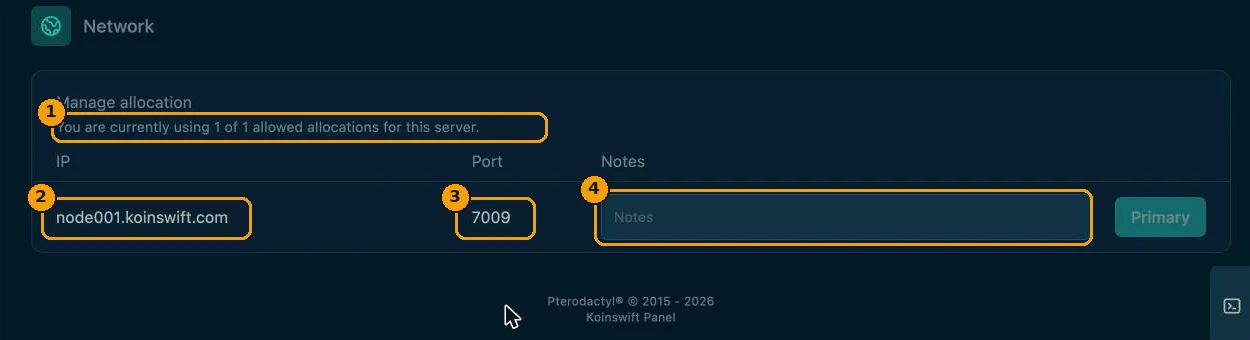
Your server’s ports on the Network page. - Download the plugins
On geysermc.org/download, download Geyser and Floodgate in their Spigot version (it also works for Paper).
- Put them in plugins
Stop the server and place both
.jarfiles in thepluginsfolder. - Start once
The configuration files are created. Then stop the server.
- Set the Bedrock port
Open
plugins/Geyser-Spigot/config.yml. In thebedrocksection, replace theportvalue with your second port. Check thatauth-typeis set tofloodgate. - Start the server
The console should show that Geyser has started.
bedrock:
  port: 25566   # your second port
remote:
  auth-type: floodgate
For Bedrock players
They add a server with the same address as Java players, but the second port. On console, joining an external server works the same way as for a Bedrock server: see Connect to your Minecraft Bedrock server.
- By default, a Bedrock player’s name starts with a dot (for example
.Steve). - With the whitelist on, add a Bedrock player with the Floodgate command
fwhitelist add Name. - Geyser follows Bedrock updates: update the plugin when Bedrock players can no longer join.
Geyser uses a little extra CPU, especially with many Bedrock players.
Need a hand?
The Koinswift team answers 7 days a week, by ticket from your client area or on Discord.