


Order your free FreeBox
Choose your game and get your free server in a few minutes, with no bank card.
- Create your account and verify your email
Verifying your email address is mandatory. Disposable addresses are not accepted.
- Choose your game
On the FreeBox page, click the game you want.
- Check the product page
It recaps the resources and conditions. For Minecraft Java, enter the version you want (or
latest).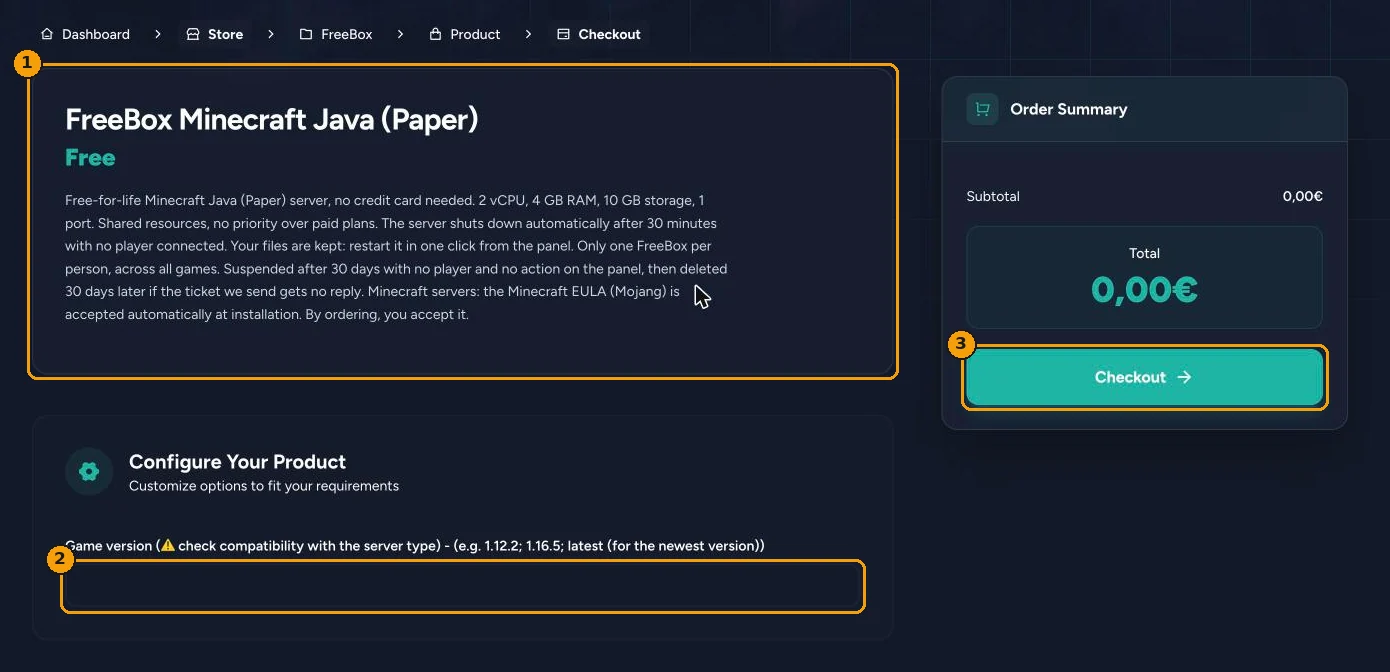
Description and conditions (1), game version (2), Checkout (3). - Check out
Click Checkout, tick the Terms of Service and confirm. The total is €0.00: no payment is requested.
- Go to your server
The FreeBox appears under Services. Click Open the panel and start it.
If the order is refused, you probably already have a FreeBox on your account (only one per person, whatever the game).
Need a hand?
The Koinswift team answers 7 days a week, by ticket from your client area or on Discord.