


Install plugins (Paper, Spigot)
Add plugins to a Paper or Spigot server from the panel.
A plugin adds features to the server (land protection, economy, mini-games…) without players having to install anything. You need a Paper or Spigot server.
- Download the plugin
From a trusted site: Modrinth, Hangar (PaperMC) or SpigotMC. Choose the version compatible with your Minecraft version. The file ends in
.jar. - Open the plugins folder
In Files, open
plugins(created on first start). - Upload the file
Upload → upload files, or upload from URL with the direct download link.
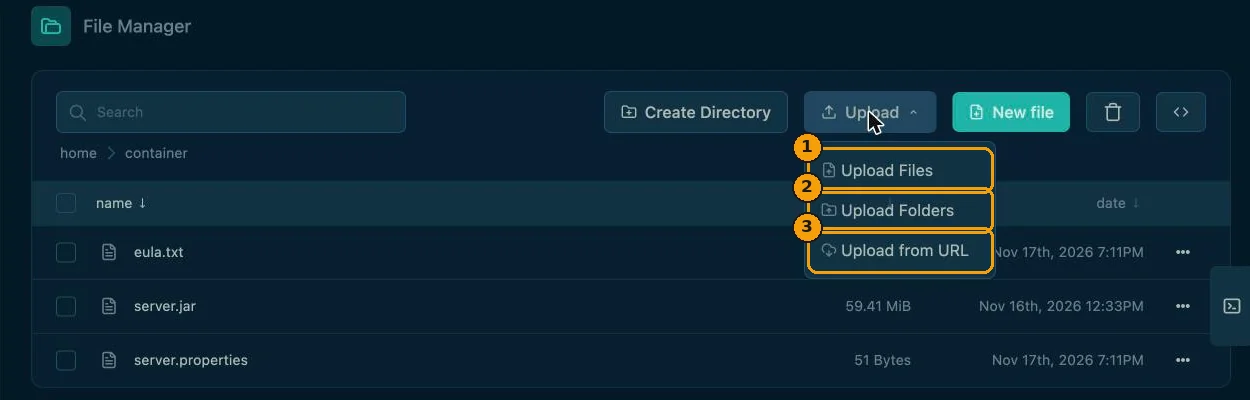
Upload files (1) or from a URL (3). - Restart the server
The plugin loads at startup and creates its configuration folder in
plugins. - Check
Type
pluginsin the console: loaded plugins are shown in green.
Avoid hot-reload commands (reload): they often cause bugs. Restart the server instead.
Only download plugins from trusted sources: a malicious plugin can hand control of your server to a stranger.
Need a hand?
The Koinswift team answers 7 days a week, by ticket from your client area or on Discord.