


Minecraft: choose the version and server type when ordering
Fill in the Minecraft Java order options correctly: game version and server type (Vanilla, Paper, Fabric, Forge…).
For Minecraft Java, two order options decide how your server is installed.
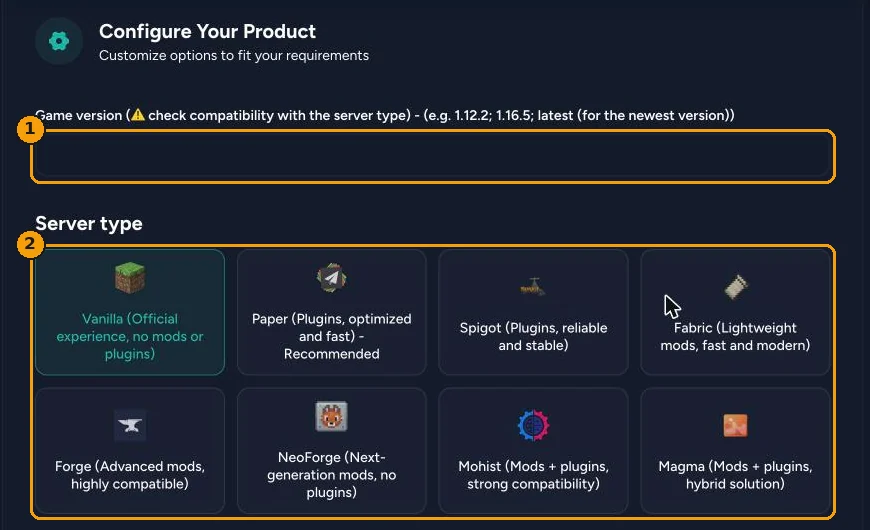
The game version
Enter the version you want, for example 1.20.1 or 1.21.1, or latest for the newest available version. Choose the version your mods or plugins require: a mod built for 1.20.1 will not work on 1.21.
The server type
| Type | What it is for |
|---|---|
| Vanilla | The official game, with no mods or plugins. |
| Paper (recommended) | Plugins and better performance. The right choice in most cases. |
| Spigot | Plugins; the long-standing, stable option. |
| Fabric | Lightweight, up-to-date mods. |
| Forge | “Heavy” mods and a very large number of modpacks. |
| NeoForge | Next-generation mods (the successor to Forge for recent versions). |
| Mohist / Magma | Mods and plugins on the same server (hybrid solutions, less stable). |
A plugin is installed only on the server (Paper, Spigot): players have nothing to install. A mod (Fabric, Forge, NeoForge) usually has to be installed by every player as well.
You can change version later from the panel (Startup tab).
Need a hand?
The Koinswift team answers 7 days a week, by ticket from your client area or on Discord.