


Restore a backup
Put your server back into the state of an earlier backup.
Restoring replaces the server’s current files with those in the backup.
- Open the backup’s menu
In Backups, click ••• on the right of the backup.
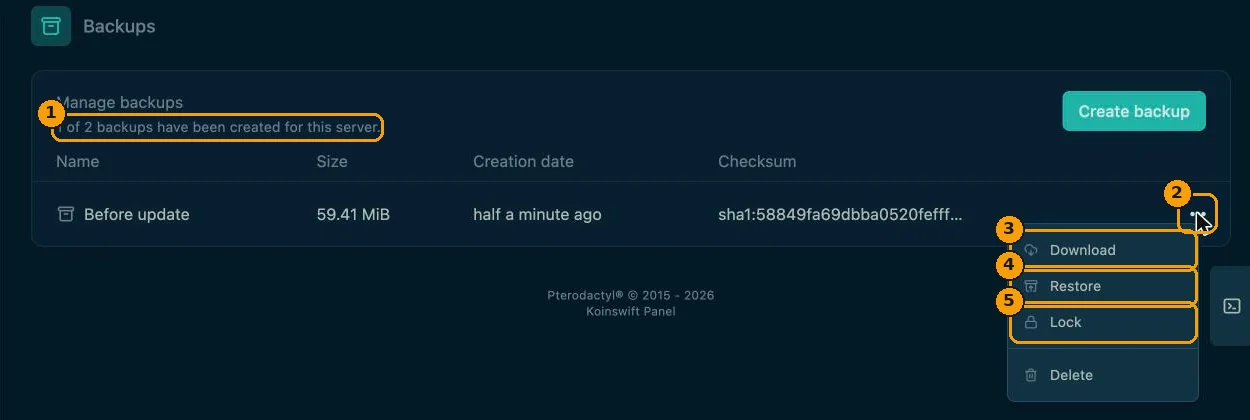
Backup counter (1), ••• menu (2), Download (3), Restore (4), Lock (5). - Click “Restore”
A confirmation window opens.
- Choose the clean-up option
Delete all files before restoring backup: tick it to return exactly to the backup’s state (files created since will be erased). Unticked, the backup’s files replace the existing ones but newer files stay.
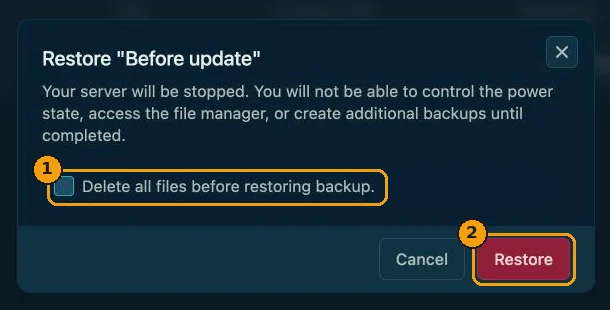
Delete-first option (1) and Restore button (2). - Confirm
Click Restore. The server is stopped; during the operation you cannot start it, open the file manager or create other backups.
- Restart
Once the restore has finished, start the server and check your world.
Before restoring an old backup, create a backup of the current state if you have room: you can come back to it if needed.
Need a hand?
The Koinswift team answers 7 days a week, by ticket from your client area or on Discord.